Still image: BMP, GIF, JPG, PNG, TIF
Video: MPG, AVI, WMV, ASF, MOV/MP4*
Audio: MP3, MID, WAV, MPA, AIF, Streaming
Web: local content or http URL website
Banner: Plain text or RSS feed
Adobe: SWF*
* Requires downloadable add-in or codec
eSign Site Manager is an editing and remote site management system for eSign client playback systems. It includes the advanced editor in eSign Edit and adds the Site Manager for remote updating and Site Monitor for monitoring of eSign client systems. eSign Site Manager utilizes LAN server, NAS, local or internet FTP storage to deploy remote sites for nearly limitless locations. Use this product to remotely update systems running eSign Lite, 10, 20 or 30. See the usage models.
Features
- Drag and drop single or multiple files to quickly add content
- Unlimited playback zone layout, create your own templates
- Sizeable workspace with multi-window user interface
- Player position reference preview
- Scaled playback preview
- Network or local content files
- Save / restore workspace layouts
- Timeline display for Individual players color coded to player positions in reference preview
- Built in Web and File Explorer
- Supports all versions of eSign client products
- Project Manager for daily, weekly and specific date scheduling with Manual Mode for random project playback
- Remote update and monitoring of eSign playback systems
- Unlimited Sites and Clients
System Requirements
Windows 7 64 bit, 8 GIG RAM
Windows 8.1 64 bit, 8 GIG RAM
Windows 10 64 bit, 8 GIG RAM
Quad Core CPU or better
Open USB port, 5MB diskspace
Network/internet connection
High performance video card recommended for multiple
simultaneous video playback
1920x1200 or higher resolution display recommended
US PricingWindows 8.1 64 bit, 8 GIG RAM
Windows 10 64 bit, 8 GIG RAM
Quad Core CPU or better
Open USB port, 5MB diskspace
Network/internet connection
High performance video card recommended for multiple
simultaneous video playback
1920x1200 or higher resolution display recommended
Please contact us for pricing
Educational and Government discounts available
eSign Product Grid
Please contact us with any questions regarding eSign Edit.
eSign Site Manager multi-window user interface

eSign Edit Reference Preview displaying position and size
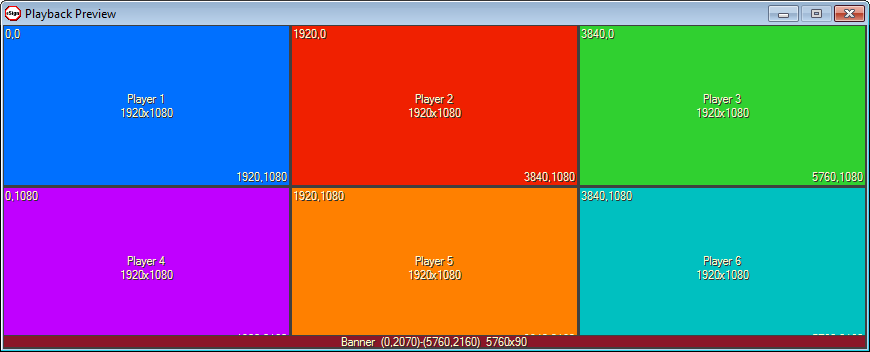
eSign Edit Preview Playback